
Network Requirements
Describes the requirements for operating PICT Up on the customer's environment and for sending data to the cloud.
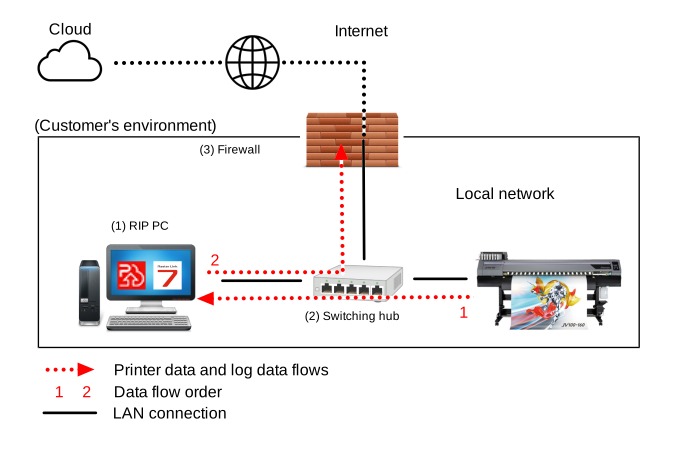
(1) RIP PC
- Connect a LAN cable to the LAN port on the RIP PC.
- Set the network settings on the printer and RIP PC to DHCP.

- If a fixed IP address needs to be set, contact your network administrator.
(2) Switching hub
- Connect the printer and RIP PC via a switching hub.
- Connect the switching hub to a local network connected to the Internet.
- Ensure the switching hub and LAN cable can handle maximum transfer speeds of at least 1 Gbps.
(3) Firewall
- Check to confirm that connection to the Internet is possible.
For further details, contact your network administrator. - Use a standard website access port for the interface port used with the cloud. (TCP port No. 443)
