
CSV file output is not possible
If file downloading does not start for CSV output, check the browser to confirm that pop-ups are not being blocked.
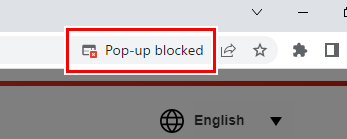
If pop-ups are being blocked, use the following procedure to allow pop-ups.
- Click the Pop-up blocked icon (
 ).
).
- A dialog appears.
- Select [Always allow pop-ups and redirects from https://mcloudtec.mimaki.com], then click [Done].
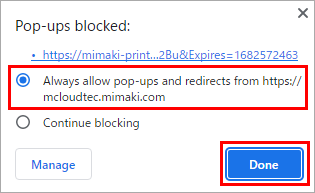

- The image shown here shows the display when using Google Chrome.
Use the appropriate method for your browser to allow pop-ups for [https://mcloudtec.mimaki.com].
