
Setting Consumable Cost
Setting the currency unit
- Click [Change] under [Currency Unit].
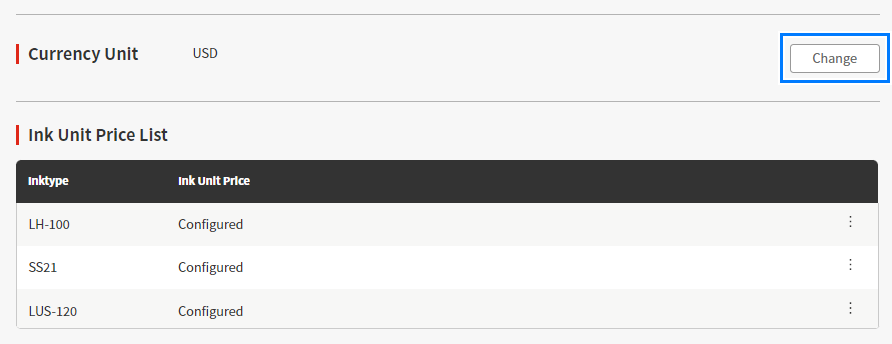
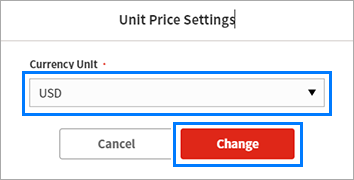
- The [Unit Price Settings] dialog box appears.
- Select a currency unit from the [Currency Unit] list and click [Change].
- Confirm that the entered currency unit is displayed as the currency unit.

- If you change the currency unit, change the ink unit price setting accordingly.
Failure to change the ink unit cost setting may result in display of incorrect ink cost.
Setting the ink unit price
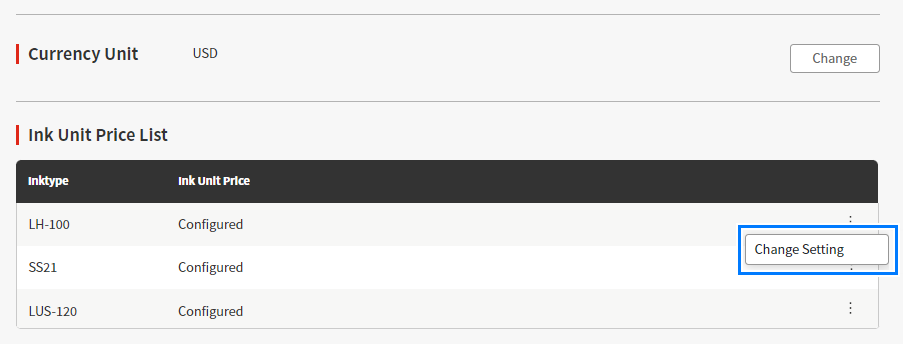
- Click [Change Setting] from the menu for the [Ink Unit Price List] item.
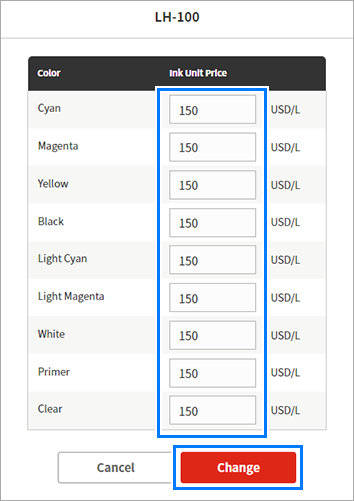
- The [Ink Unit Price Setting] dialog box appears.

- Any ink unit price already set is displayed in the [Ink Unit Price] column.
- Enter the ink unit price, then click [Change].
- Confirm that [Configured] is displayed in the [Ink Unit Price] column for the type of ink for which you have set the ink unit price.
