
I want to output the printer maintenance information on a PC
The PICT Up maintenance information acquisition function can be used to output the printer maintenance information in CSV format.

- This is available only for models that support maintenance information parameters.
- If you are not sure whether your model supports maintenance information parameters, refer to the Operation Manual.
Download page: https://mimaki.com/download/
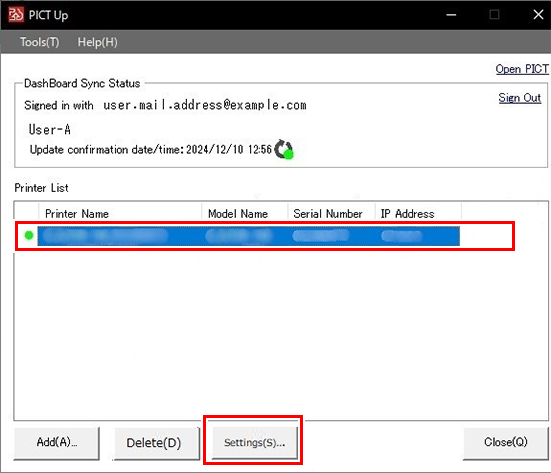
- Select the printer for which maintenance information is to be acquired on the printer list screen, then click [Settings].
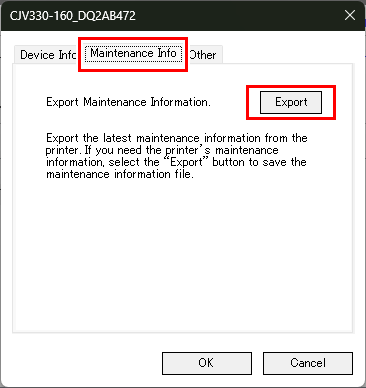
- Select the [Maintenance Information] tab, click [Export], and specify the destination and file names for maintenance information files.
- The following information is output in CSV format:
Maintenance information items | Maintenance information sub-items | Details |
|---|---|---|
[Printer Information] | [Installation Date] | Printer installation date |
[Organization Name] | Organization name | |
[Model] | Printer model | |
[Ink Set] | Installed ink set | |
[Serial] | Printer serial number | |
[Components] | Genuine parts usage status | |
[Used Ink Type] | Genuine ink usage status | |
[Ambient temperature] | Printer ambient temperature (°C) | |
[Main Power Downtime] | Number of consecutive days main power supply is turned off | |
[Maintenance Information] | [Maintenance rate] | Percentage of maintenance performed within recommended maintenance interval |
[Failure Locations] | List of failure locations | |
[Media Jam Count] | Media jam count | |
[Head Information] | [Head ID] | Head ID of installed head |
[Exchange Date] | Time and date of head replacement | |
[Usage Period] | Number of days since installation or replacement | |
[Used Nozzle Recovery] | Nozzle recovery function usage status | |
[Nozzle Recovery Date] | Nozzle recovery setting date | |
[Nozzle Recovery Count] | Number of nozzles set for recovery | |
[Nozzle Surface Condition] | Nozzle surface condition after nozzle clogging check |
