
Asking the AI Chatbot Questions
You can use the AI chatbot to ask questions about details in the manuals for the products listed on the Mimaki Engineering Product Page (https://mimaki.com/product/).

- The AI chatbot can be used on the following windows:
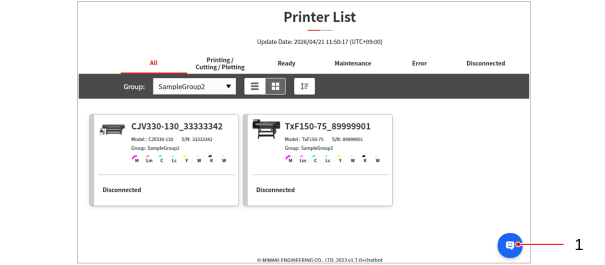
Printer List window/Printer Status window/Organization Dashboard window/Report window - When the AI chatbot is opened on the Printer List window, automatic screen refreshing will be suspended.
- When the AI chatbot is hidden
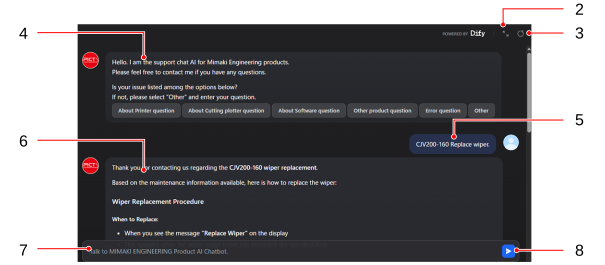
- When the AI chatbot is displayed
No. | Item | Operation |
|---|---|---|
1 | Chatbot open/close | Opens and closes the chatbot.
|
2 | Expand/reduce | Expands and reduces the chatbot window.
|
3 | Question history reset | Resets the question history and starts a new question. |
4 | Frequently asked questions | Allows you to select a question from the frequently asked questions. |
5 | Question history | Displays the questions asked by the user. The window is displayed toward the right side of the screen. |
6 | Answer history | Displays the AI chatbot answers. The window is displayed toward the left side of the screen. |
7 | Question input | The box for entering questions by the user. Only text can be entered here. |
8 | Send question | Sends the question entered by the user to the AI chatbot. |
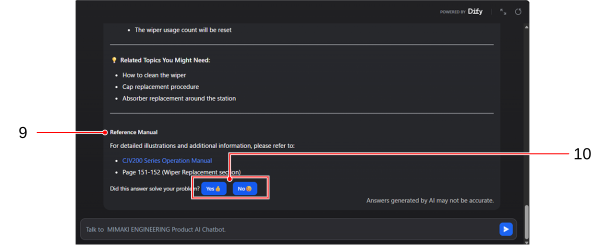
9 | [Reference manual] | Displays the manual referenced when creating the answer. |
10 | Feedback buttons | Sends feedback on whether the details given in the answers were appropriate or not. |
