
Nagano, Japan, April 9th, 2026
Mimaki Engineering Co., Ltd. (Headquarters: Tomi City, Nagano Prefecture; President and CEO: Kazuaki Ikeda) will begin offering "Mimaki 3D Print prep Pro ver2.0" (hereinafter "3DP3v2"), a significantly updated version of its cloud-based software service "Mimaki 3D Print prep Pro" (hereinafter "3DP3") that automatically optimizes 3D data for 3D printing, starting in June 2026.
Prior to the launch, we will conduct demonstrations at RAPID + TCT 2026 (Boston, USA), which begins on April 13, showcasing the entire process from data preparation to 3D printing using this software, and introducing visitors to its simple and smart data preparation process.
Background and Challenges of the 3D Printing Market
In recent years, the 3D printing market has continued to grow steadily. Its applications have expanded significantly, extending beyond prototyping in manufacturing to include mass production of final products, the medical and architectural fields, and even use by individual creators.
On the other hand, "data preparation" for the 3D printing process remains one of the major challenges. 3D data created using CAD, CG, or 3D scanning may not be suitable for printing as-is, requiring users to check for and correct issues such as missing features or irregular mesh structures (the surface structure of 3D data) before printing (Figure 1). These tasks require specialized knowledge and a considerable amount of time. Furthermore, high-performance data correction software tools are generally expensive and complex to operate, creating a significant barrier to adoption, particularly for beginners.
Against this backdrop, "simplifying and automating data preparation" has become a critically important theme for realizing the further adoption of 3D printing and expanding the market.
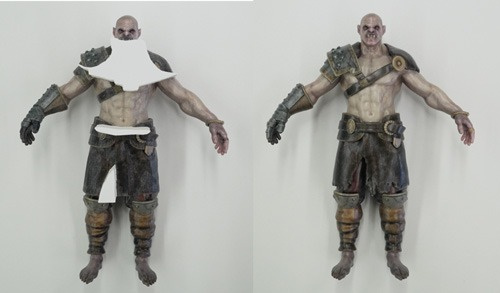
Fig 1. Sample 3D-printed without adjusting the CG data (left) Sample 3D-printed after adjusting the data (right)
Update Overview
3DP3, which we launched in 2021, has significantly lowered barriers to adoption—such as cost and the need for specialized knowledge—and is now being utilized by many customers. With this update to 3DP3v2, we have added features that expand the scope of application while retaining the ease of implementation offered by the existing monthly subscription model and the automatic optimization functionality. The three main features are as follows:
1) Automatic lattice structure conversion function
In addition to the conventional hollow (open interior) and solid (closed interior) structures, a lattice structure is now available as an option for the internal structure of 3D-printed objects. With four selectable lattice patterns and freely adjustable density settings, this feature not only reduces the weight of the printed object (Fig. 2) but also, when combined with flexible 3D printing materials, enables the reproduction of textures such as cushioning and the softness of fabric (Fig. 3). This enables the creation of mockups that reproduce multi-directional flexibility for prototype models of items such as shoes, sofas, and beds.
Furthermore, since it allows for the rapid prototyping and evaluation of tip shapes and softness that make it easier for robotic arms to grasp objects, it can also be utilized for design verification on the production floor (Fig. 4).
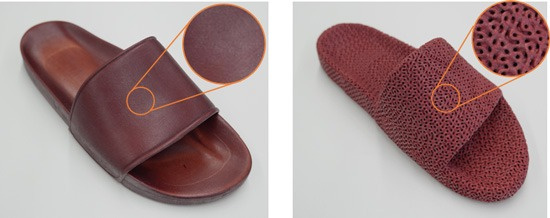
Fig 2. Solid structure (left) and lattice structure (right); approximately 15% lighter | All were printed using our full-color 3D printer
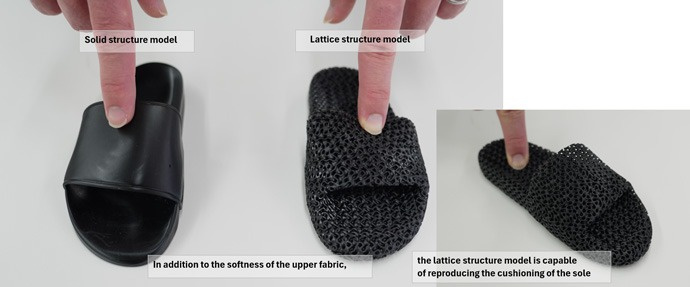
Fig 3. Models expressing the softness and cushioning of the fabric | Printed using a commercially available stereolithography 3D printer
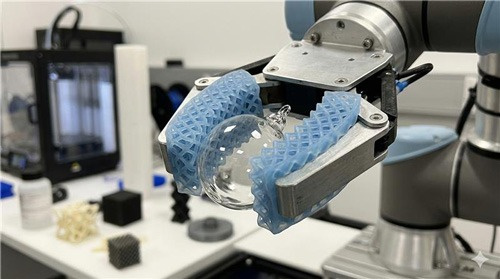
Fig 4. Prototype image of the robot arm's tip design
2) Direct conversion from laser measurement (LiDAR scan) data
3DP3v2 can convert a wide range of data—including topographic and architectural measurement data collected by drones, as well as scan data from crime scenes and archaeological sites—into 3D printing data (Figure 5). This significantly streamlines the process from measurement data to 3D printing.
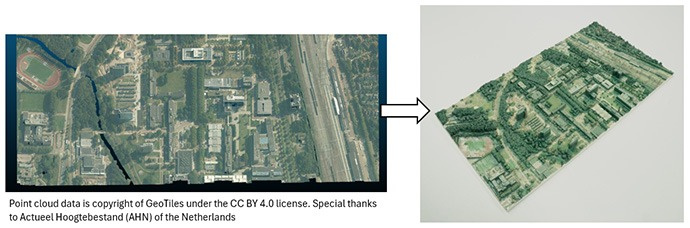
Fig 5. 3D-printed model (right) based on LiDAR scan data of the terrain (left)
3) Seamless Conversion from CT (Cross-sectional) Scan Data
CT scan data, which visualizes internal structures, traditionally required the use of multiple software programs to convert it into 3D printing data in a step-by-step process, making the workflow cumbersome and time-consuming. 3DP3v2 revises this traditional workflow, enabling the conversion of CT scan data into 3D printing data to be completed within a single software application (Figure 6).
This significantly reduces the time from CT imaging to printing, allowing for the rapid creation of 3D models used in treatment planning within the medical field. Furthermore, in the research field, it makes it easier than ever to create models that visually and clearly reproduce the internal structures of organisms and cultural artifacts (Figure 7).
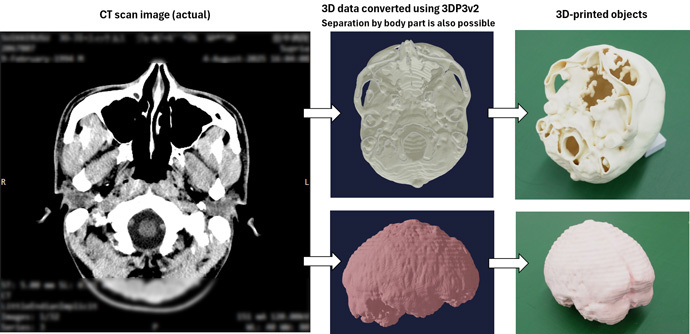
Fig 6. Example workflow from CT scan data to 3D printing
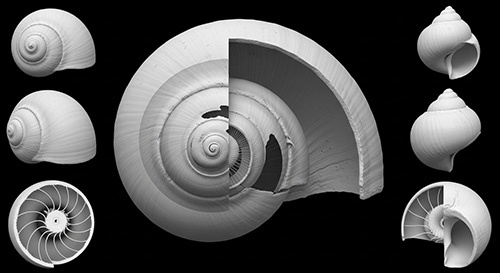
Fig 7. Image of CT scan data of a snail
Furthermore, while the previous version of 3DP3 was offered as a cloud service, this update now allows it to be used even in environments without an internet connection*1,2,3. This reduces the risk of confidential information leaks and intellectual property risks associated with handling 3D printing data, enabling more secure operations.
*1. Limited to customers who own one of Mimaki’s 3D printers
*2. Some features may not be available. Please refer to the feature comparison chart for details
*3. A regular internet connection is required for license authentication
With this update, we are further lowering the barriers to data preparation for 3D printing, providing an environment that enables more customers to transition smoothly to 3D printing.
Moving forward, Mimaki Engineering will continue to contribute to our customers' manufacturing efforts by providing solutions that expand the possibilities of 3D printing.
Feature comparison chart ✓: Applicable
| Feature | 3DP3 | 3DP3v2 Cloud Application | 3DP3v2 Local Application |
|---|---|---|---|
| Max. file size | 1,000MB | 1,000MB | Unlimited |
| Supported file formats | .obj .stl .3mf .vrm | .obj .stl .3mf .vrm .ply .wrl .fbx .dcm .las | .obj .stl .3mf .ply .wrl |
| Lattice structure | N/A | ✓ | ✓ |
| DICOM scan conversion | N/A | ✓ | N/A |
| LiDAR scan conversion | N/A | ✓ | N/A |
| Mirroring | N/A | ✓ | ✓ |
| Measuring function | N/A | ✓ | N/A |
| Model Cutting | N/A | ✓ | N/A |
| Labeling | N/A | ✓ | N/A |
| Offline mode | N/A | N/A | ✓ |
About Mimaki Engineering Co., Ltd.
Mimaki Engineering develops, manufactures, sales, and maintains industrial inkjet printers, cutting plotters, 3D printers, inks, and software. By providing total solutions for the printing process for the sign graphics, industrial products, and textile apparel markets, we aim to be an innovator that constantly delivers "Something New, Something Different" to our customers.
Company/IR website: https://ir.mimaki.com/en/
Product website: https://mimaki.com/
Contact
MIMAKI ENGINEERING CO., LTD.
Global Marketing Department
1628-1 Shigeno-Otsu, Tomi-city, Nagano 389-0512 JAPAN
Tel: +81-(0)268-80-0078 / Fax: +81-(0)268-80-0041