
Update Information of PICT ver2.0.0
What's New in PICT v2.0.0
- Remote viewing of USB camera feeds
- Remote printer operation
- Saving RasterLink8 settings to cloud storage
- Two-step verification
- Minor UI improvements and bug fixes
- Added support for the following models.
- UJF200 Series
- TxF330-800
- JFX220-2515
PICT organization registration or sign-in from here.
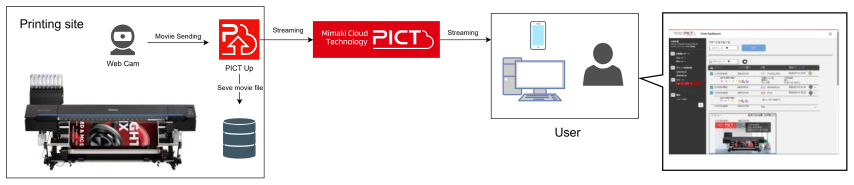
Remote Viewing of USB Camera Video By connecting a USB camera to the PC running PICT Up, you can now remotely view the camera video through PICT. This allows you to monitor printing in real time, even for long-running jobs such as long-length printing.
Remote Printer Operation You can now remotely control printers from PICT Dashboard, including the following operations:
- Pause/resume printing
- Cancel printing
- Head cleaning
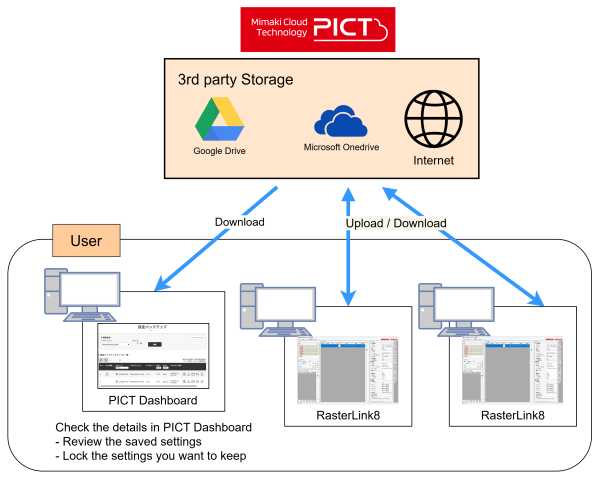
- Saving RasterLink8 Settings to Cloud Storage By linking your own third-party cloud storage account (Google Drive or OneDrive) to PICT, you can save RasterLink8 settings*1 to the cloud. The settings saved in the cloud can be downloaded and used when restoring settings after a PC failure or when applying the same settings to RasterLink8 on another PC. *1 For information on how to save and restore settings, refer to the RasterLink8 manual.
- Two-Step Verification Two-step verification is now available to enhance the security of your PICT account. When two-step verification is enabled, an email containing a security code will be sent to your registered email address after you click Sign In. Enter the correct security code to complete the verification and sign in to PICT.
Update Information of PICT Up ver2.00
- Added support for the following models.
- UJF200 Series
- TxF330-800
- JFX220-2515
- Added support for registering USB cameras and streaming camera video
- Added support for remote printer operation
- Bug fixes
Updater installer of PICT Up is downloadable from here.
- Fixed the following issue.
No Fix Details 1 The ink usage graph for the hybrid ink set on the Tx330-1800 is not displayed correctly.